Boosting 이란?
- 여러 개의 약한 Decision Tree를 조합해서 사용하는 Ensemble 기법 중 하나이다.
- 즉, 약한 예측 모형들의 학습 에러에 가중치를 두고, 순차적으로 다음 학습 모델에 반영하여
- 강한 예측모형을 만드는 것이다.
XGBoost 란?
- XGBoost는 Extreme Gradient Boosting의 약자이다.
- Boosting 기법을 이용하여 구현한 알고리즘은 Gradient Boost 가 대표적인데
- 이 알고리즘을 병렬 학습이 지원되도록 구현한 라이브러리가 XGBoost 이다.
- Regression, Classification 문제를 모두 지원하며, 성능과 자원 효율이 좋아서, 인기 있게 사용되는 알고리즘이다.
XGBoost의 장점
- GBM 대비 빠른 수행시간
- 병렬 처리로 학습, 분류 속도가 빠르다.
- 과적합 규제(Regularization)
- 표준 GBM 경우 과적합 규제기능이 없으나, XGBoost는 자체에 과적합 규제 기능으로 강한 내구성 지닌다.
- 분류와 회귀영역에서 뛰어난 예측 성능 발휘
- 즉, CART(Classification and regression tree) 앙상블 모델을 사용
- Early Stopping(조기 종료) 기능이 있음
- 다양한 옵션을 제공하며 Customizing이 용이하다.
하이퍼파라미터 튜닝
-
reference
- https://xgboost.readthedocs.io/en/latest/python/python_api.html
-
XGBRegressor 하이퍼파라미터 예
XGBRegressor(base_score=0.5, booster='gbtree', colsample_bylevel=1, colsample_bynode=1, colsample_bytree=1, gamma=0, gpu_id=-1, importance_type='gain', interaction_constraints='', learning_rate=0.1, max_delta_step=0, max_depth=5, min_child_weight=1, missing=nan, monotone_constraints='()', n_estimators=100, n_jobs=0, num_parallel_tree=1, random_state=0, reg_alpha=0, reg_lambda=1, scale_pos_weight=1, subsample=1, tree_method='exact', validate_parameters=1, verbosity=None) -
XGBoost는 다수의 하이퍼파라미터가 존재하며, 다음 세가지 범주로 나뉜다.
- 일반 파라미터
- 부스팅을 수행할 때 트리를 사용할지, 선형 모델을 사용할지 등을 고른다.
- 부스터 파라미터
- 선택한 부스터에 따라서 적용할 수 있는 파라미터 종류가 다르다.
- 학습 과정 파라미터
- 학습 시나리오를 결정한다.
- 일반 파라미터
-
일반 파라미터
- booster [기본값 = gbtree]
- 어떤 부스터 구조를 쓸지 결정한다.
- 의사결정기반모형(gbtree), 선형모형(gblinear), dart가 있다.
- n_jobs
- XGBoost를 실행하는 데 사용되는 병렬 스레드 수
- verbosity [기본값 = 1]
- 유효한 값은 0 (무음), 1 (경고), 2 (정보), 3 (디버그)
- booster [기본값 = gbtree]
-
부스터 파라미터
- gbtree Booster의 파라미터
- learning_rate [ 기본값 : 0.3 ]
- learning rate이다.
- learning rate가 높을수록 과적합 하기 쉽다.
- n_estimators [ 기본값 : 100 ]
- 생성할 weak learner의 수
- learning_rate가 낮을 땐, n_estimators를 높여야 과적합이 방지된다.
- max_depth [ 기본값 : 6 ]
- 트리의 maximum depth이다.
- 적절한 값이 제시되어야 하고 보통 3-10 사이 값이 적용된다.
- max_depth가 높을수록 모델의 복잡도가 커져 과적합 하기 쉽다.
- min_child_weight [ 기본값 : 1 ]
- 관측치에 대한 가중치 합의 최소를 말한다.
- 값이 높을수록 과적합이 방지된다.
- gamma [ 기본값 : 0 ]
- 리프노드의 추가분할을 결정할 최소손실 감소값이다.
- 해당값보다 손실이 크게 감소할 때 분리한다.
- 값이 높을수록 과적합이 방지된다.
- subsample [ 기본값 : 1 ]
- weak learner가 학습에 사용하는 데이터 샘플링 비율이다.
- 보통 0.5 ~ 1 사용된다.
- 값이 낮을수록 과적합이 방지된다.
- colsample_bytree [ 기본값 : 1 ]
- 각 tree 별 사용된 feature의 퍼센테이지이다.
- 보통 0.5 ~ 1 사용된다.
- 값이 낮을수록 과적합이 방지된다.
- lambda [기본값 = 1, 별칭 : reg_lambda]
- 가중치에 대한 L2 Regularization 적용 값
- 피처 개수가 많을 때 적용을 검토
- 이 값이 클수록 과적합 감소 효과
- alpha [기본값 = 0, 별칭 : reg_alpha]
- 가중치에 대한 L1 Regularization 적용 값
- 피처 개수가 많을 때 적용을 검토
- 이 값이 클수록 과적합 감소 효과
- learning_rate [ 기본값 : 0.3 ]
- gbtree Booster의 파라미터
-
학습 과정 파라미터
- objective [ 기본값 : reg = squarederror ]
- reg : squarederror
- 제곱 손실이 있는 회귀
- binary : logistic (binary-logistic classification)
- 이항 분류 문제 로지스틱 회귀 모형으로 반환값이 클래스가 아니라 예측 확률
- multi : softmax
- 다항 분류 문제의 경우 소프트맥스(Softmax)를 사용해서 분류하는데 반횐되는 값이 예측확률이 아니라 클래스임. 또한 num_class도 지정해야함.
- multi : softprob
- 각 클래스 범주에 속하는 예측확률을 반환함.
- count : poisson (count data poison regression) 등 다양하다.
- reg : squarederror
- eval_metric
- 모델의 평가 함수를 조정하는 함수다.
- 설정한 objective 별로 기본설정값이 지정되어 있다.
- rmse: root mean square error
- mae: mean absolute error
- logloss: negative log-likelihood
- error: Binary classification error rate (0.5 threshold)
- merror: Multiclass classification error rate
- mlogloss: Multiclass logloss
- auc: Area under the curve
- map (mean average precision)등, 해당 데이터의 특성에 맞게 평가 함수를 조정한다.
- seed [ 기본값 : 0 ]
- 재현가능하도록 난수를 고정시킴.
- objective [ 기본값 : reg = squarederror ]
-
민감하게 조정해야하는 것
- booster 모양
- eval_metric(평가함수) / objective(목적함수)
- eta
- L1 form (L1 레귤러라이제이션 폼이 L2보다 아웃라이어에 민감하다.)
- L2 form
-
과적합 방지를 위해 조정해야하는 것
- learning rate 낮추기 → n_estimators은 높여야함
- max_depth 낮추기
- min_child_weight 높이기
- gamma 높이기
- subsample, colsample_bytree 낮추기
Sample code 1. XGBClassifier
import xgboost as xgb
import matplotlib.pyplot as plt

# 모델 선언
model = xgb.XGBClassifier()

# 모델 훈련
model.fit(x,y)

# 모델 예측
y_pred = model.predict(X_test)
Sample code 2. XGBRegressor
import xgboost as xgb

# 모델 선언
my_model = xgb.XGBRegressor(learning_rate=0.1,max_depth=5,n_estimators=100)

# 모델 훈련
my_model.fit(X_train, y_train, verbose=False)

# 모델 예측
y_pred = my_model.predict(X_test)
시각화
-
XGBoost 모형을 시각화함으로써 개발한 예측모형의 성능에 대해 더 깊은 이해를 가질 수 있다.
-
특히 의사결정나무 시각화를 위해서 graphviz 라이브러리 설치가 필요한데, 경로명 설정문제도 함께 해결하는 방식으로 아래와 같이 pip install, conda install 명령어를 연이어 실행시킨다.
pip install graphviz conda install graphviz -
xgb.plot_importance() 메쏘드에 XGBoost 모형객체를 넣어 변수중요도를 파악할 수 있다.
  import xgboost as xgb

  xgb.plot_importance(my_model)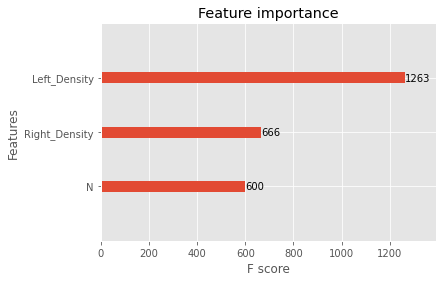
-
xgb.plot_tree() 메쏘드에 XGBoost 모형객체를 넣어 의사결정트리를 시각화할 수 있다.
-
기본값으로 트리를 저장하면 읽을 수 없을 정도로 낮은 해상도의 이미지가 생성된다.
-
이미지 크기 또는 해상도를 지정하는 옵션을 다음과 같이 지정해야한다.
  import xgboost as xgb
  import matplotlib.pyplot as plt

  # num_trees : 그림을 여러개 그릴시 그림 번호
  # rankdir : 트리의 방향, 디폴트는 위아래 방향
  # rankdir="LR" : 왼쪽에서 오른쪽 방향으로 트리를 보여준다.
  xgb.plot_tree(my_model, num_trees=0, rankdir='LR')

  fig = plt.gcf()
  fig.set_size_inches(150, 100)

  # 이미지 저장하고 싶다면
  # fig.savefig('tree.png')

  plt.show()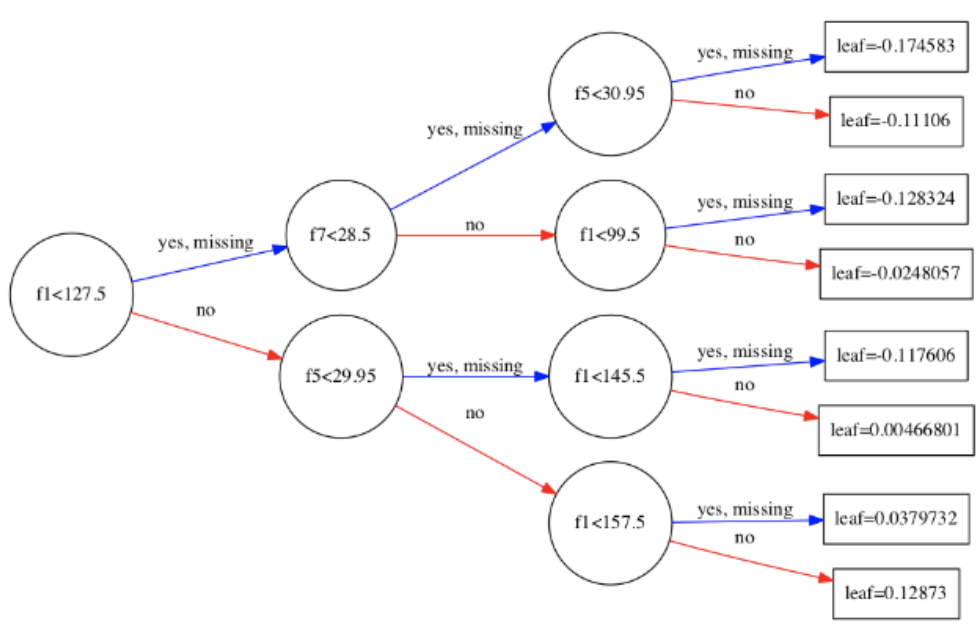
-
Source : https://wooono.tistory.com/97